AI AdvisorFind and check trade ideas.
Ask the Advisor to research trades for your outlook and risk budget. See why a setup might fit. Then ask what could weaken it and which trades deserve a closer look.
Ask the AI Advisor to find and check trade ideas. Read the market with GEX. Then use the Scanner to compare setups, what you could make, and what you could lose.
Bring unusual options activity into the picture.
Pro access for 7 days. Then Trader at $29/month unless you cancel before your trial ends. Card required. One trial per person who qualifies.
Want to start without a card? Create a free account for 3 AI Advisor chats and 3 scans a day.
Market data · Trade math you can check · You make the call
See how the Advisor looks into a setup and shows trade ideas with the reasons and trade math.
This is a recorded product example. It is not a current trade tip.
“my first day test driving, very nice easy and clear to use”
Analytics tool, not investment advice.See how it works
You’re looking for your next options trade.
A bullish market read gives you a move to watch. Gamma levels give you prices to track. A large sweep catches your eye.
But you still have to choose the trade.
You can jump between charts, chains, and feeds and still be left with those questions.
Before you put money behind an idea, you need to see how the trade could work. And how it could go wrong.
Start with a ticker you follow—or an options idea you want to check.
Ask the Advisor to research trades for your outlook and risk budget. See why a setup might fit. Then ask what could weaken it and which trades deserve a closer look.
Read the AI’s bullish, bearish, or neutral view next to the gamma levels. Check whether the market fits the move you expect and which levels could matter.
Compare ranked setups with entry, breakeven, what you could make, and what you could lose in view. Check the contracts and payoff before you choose a structure.
Look at large sweeps and other unusual options activity next to the market read and trade ideas. Ask what it adds to your case. And what else could explain it.
Keep the research connected. Send a GEX read, Scanner result, or unusual-activity finding into the Advisor with its context attached.
When the Advisor shows a trade card, read the reasons next to the screener’s numbers. Take a closer look, change the idea, or pass.
Pick a ticker. Share your outlook and risk budget.
Ask the Advisor to find screened trade ideas and explain why they might fit. See what it used to build the case—and what could go wrong.
Check the bullish, bearish, or neutral read. Look at the gamma flip, call wall, and put wall when shown.
See how those levels line up with the move you have in mind.
Look at ranked trades for your ticker. Check entry, breakeven, max profit, and max loss. Use the payoff chart to see where the trade could win or lose.
Bring unusual options activity into the check. See a large sweep? Send it to the Advisor and ask what it adds to the idea.
Then choose a setup to look at more closely—or pass.
The Advisor picks trade cards from trades the screeners have worked out. It explains the idea. The card’s numbers come from the screeners and option-chain data.
You can check the structure, entry, breakeven, and risk for yourself. You can also see which tools the Advisor uses as it works.
Still, check the answer. Data changes. Quotes can be missing or thin. A model’s rules affect its odds. AI can make mistakes.
Use the reasons and the numbers to weigh the trade.
See the case. Check the risk. You make the call.
Ask for ideas that fit your outlook and risk budget. Read the case for each setup. Ask follow-up questions about what could go wrong.
Check the AI’s bullish, bearish, or neutral view next to the gamma levels. Use that picture to weigh the move you have in mind.
See how ranked setups differ. Check what each could make or lose, its entry, and its breakeven. Look at the payoff chart. Check liquidity and quote quality, too.
A large sweep gives you a lead to check. Look at it with the rest of the data. Ask what else could explain the trade.
Send a GEX read, Scanner result, or unusual-activity finding to the AI Advisor. The starting context goes with it.
Get a second look at the setup. Ask what supports your read, what you may have missed, and what could go wrong before you trade.
Then weigh that view against your own plan.
A recorded GEX handoff: the context, the question, and the completed reply. This later snapshot shows a different market read from the GEX example below.
See the follow-up question and the Advisor’s second look at the Scanner setup.
Start with the AI Advisor’s research. Read the question, the tools it used, and the case for the idea. Check the GEX market read and levels. Then look at the Scanner’s trade card and payoff chart.
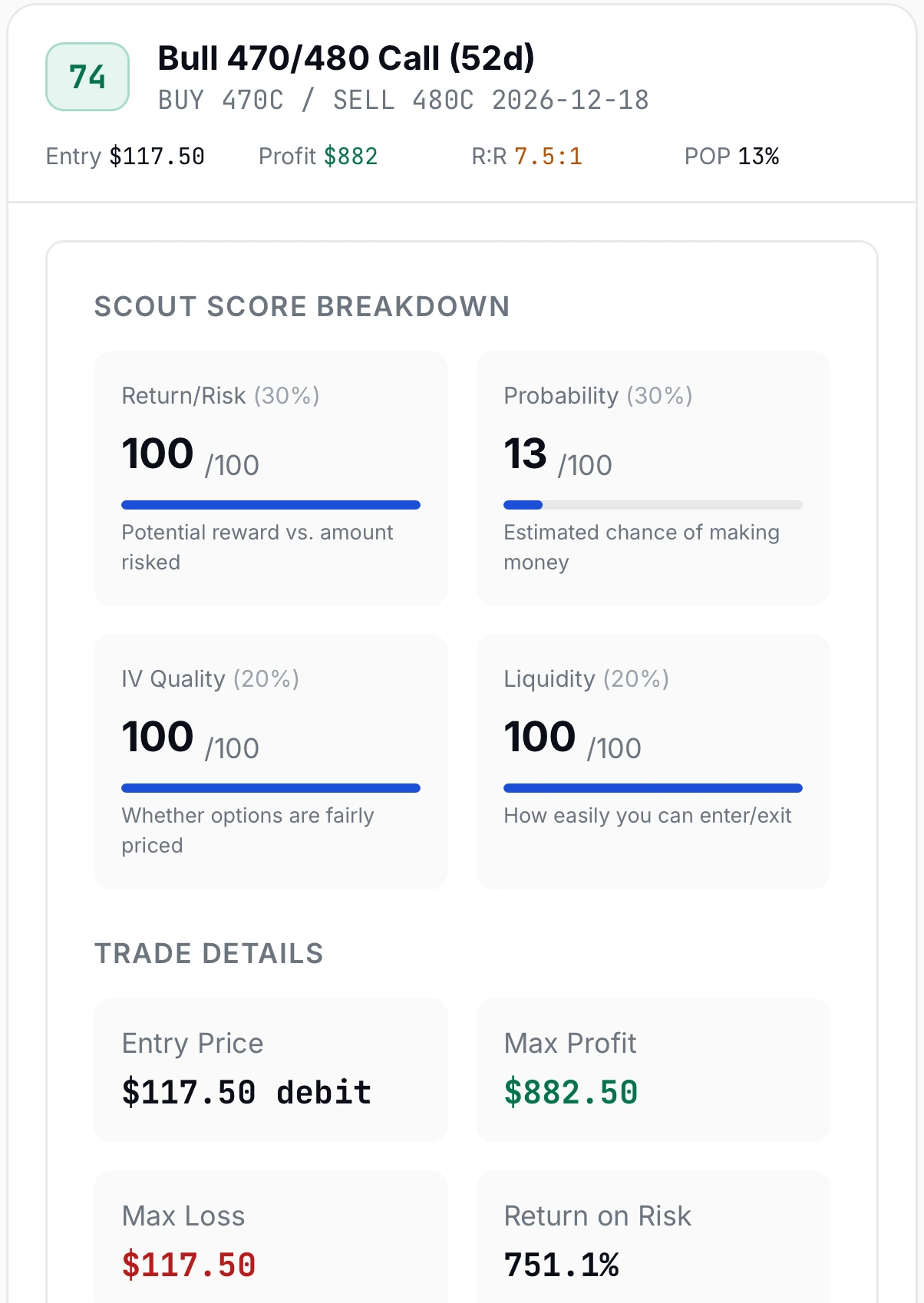
Check the contracts and expiration. Look at entry, breakeven, max profit, max loss, and estimated probability. See both sides of the payoff.
If the example uses unusual activity, check what happened and when.
Does the research help you weigh what you could make and lose? That is the test to use before you choose a trade.
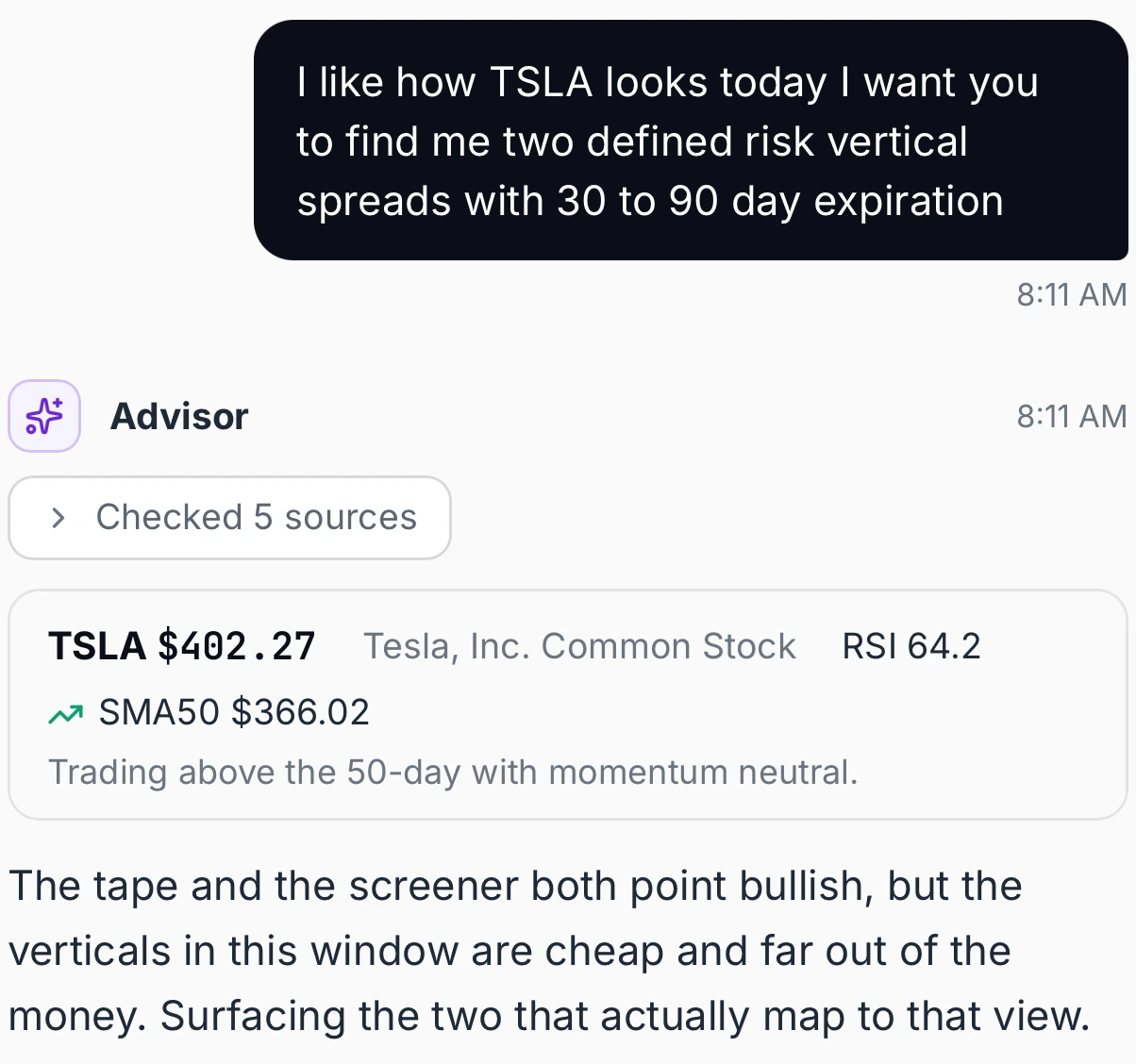
The question, the tools used, and the case for a trade idea.
Advisor example: TSLA 470/480 call spread, December 18, 2026. Estimated POP is a model estimate.
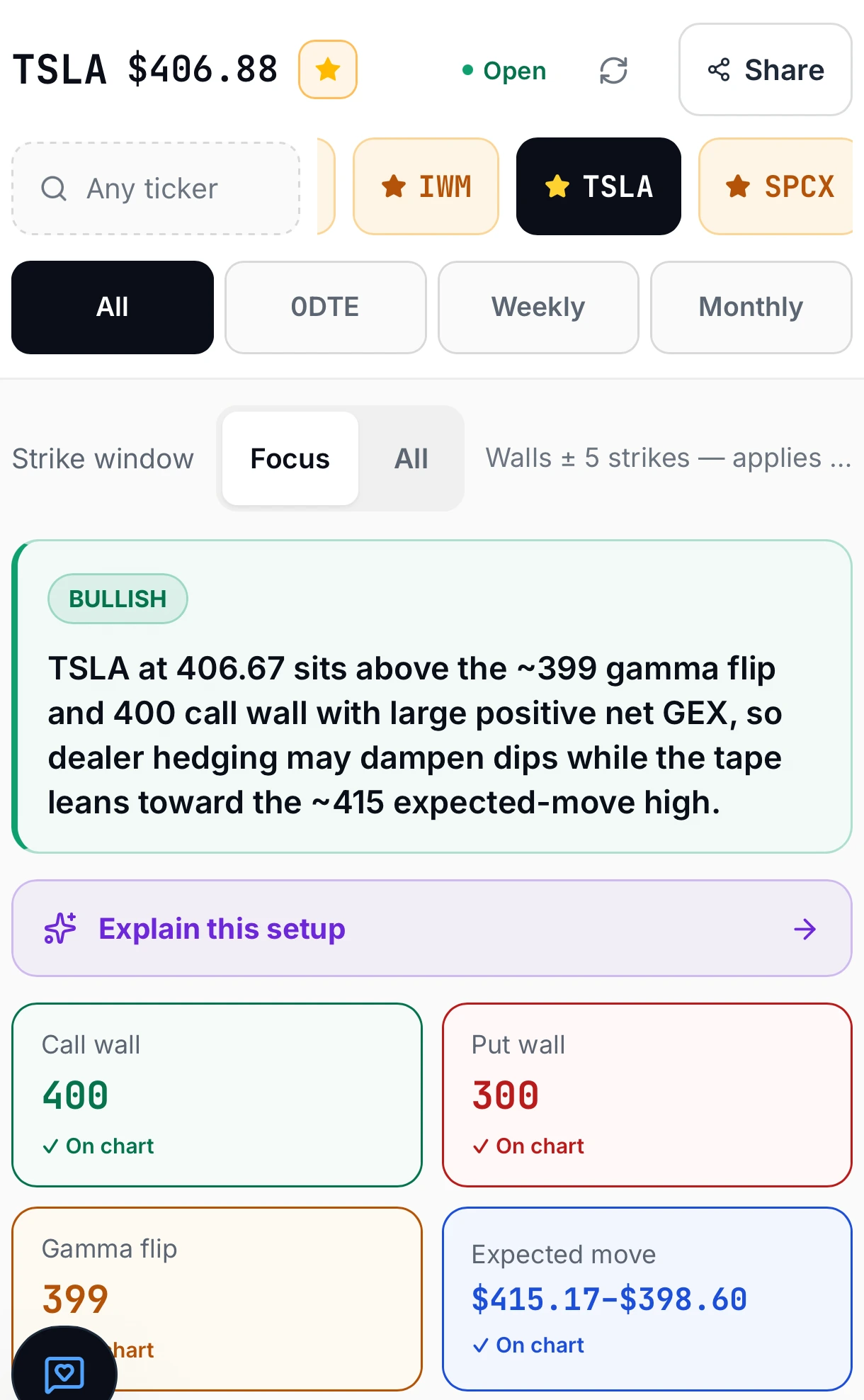
The AI market read and gamma levels around the setup.
Separate recorded snapshots. Desktop shows an earlier $350 put wall; the phone view shows a later $300 wall. Data and AI reads can update at different times.
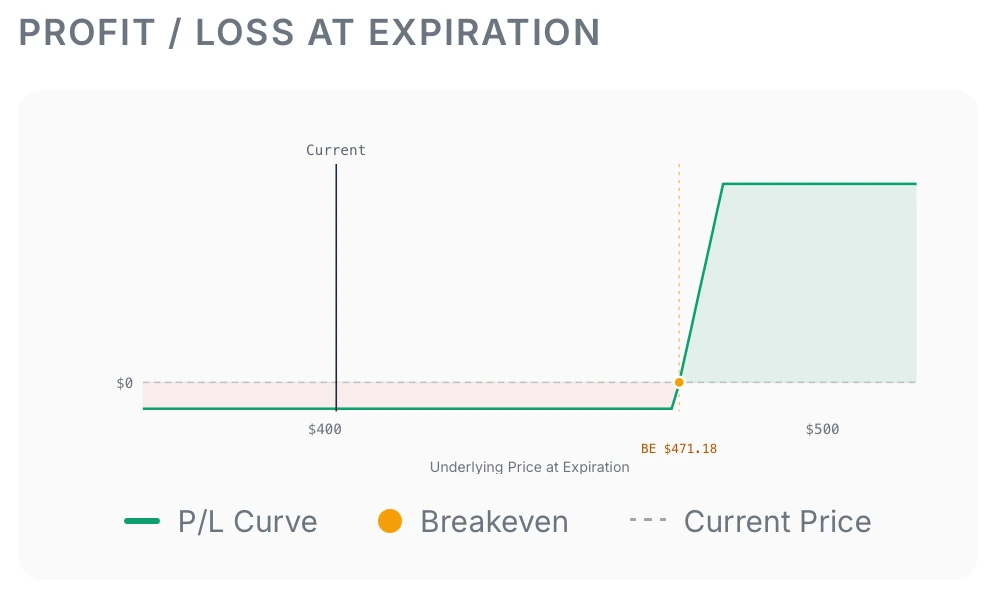
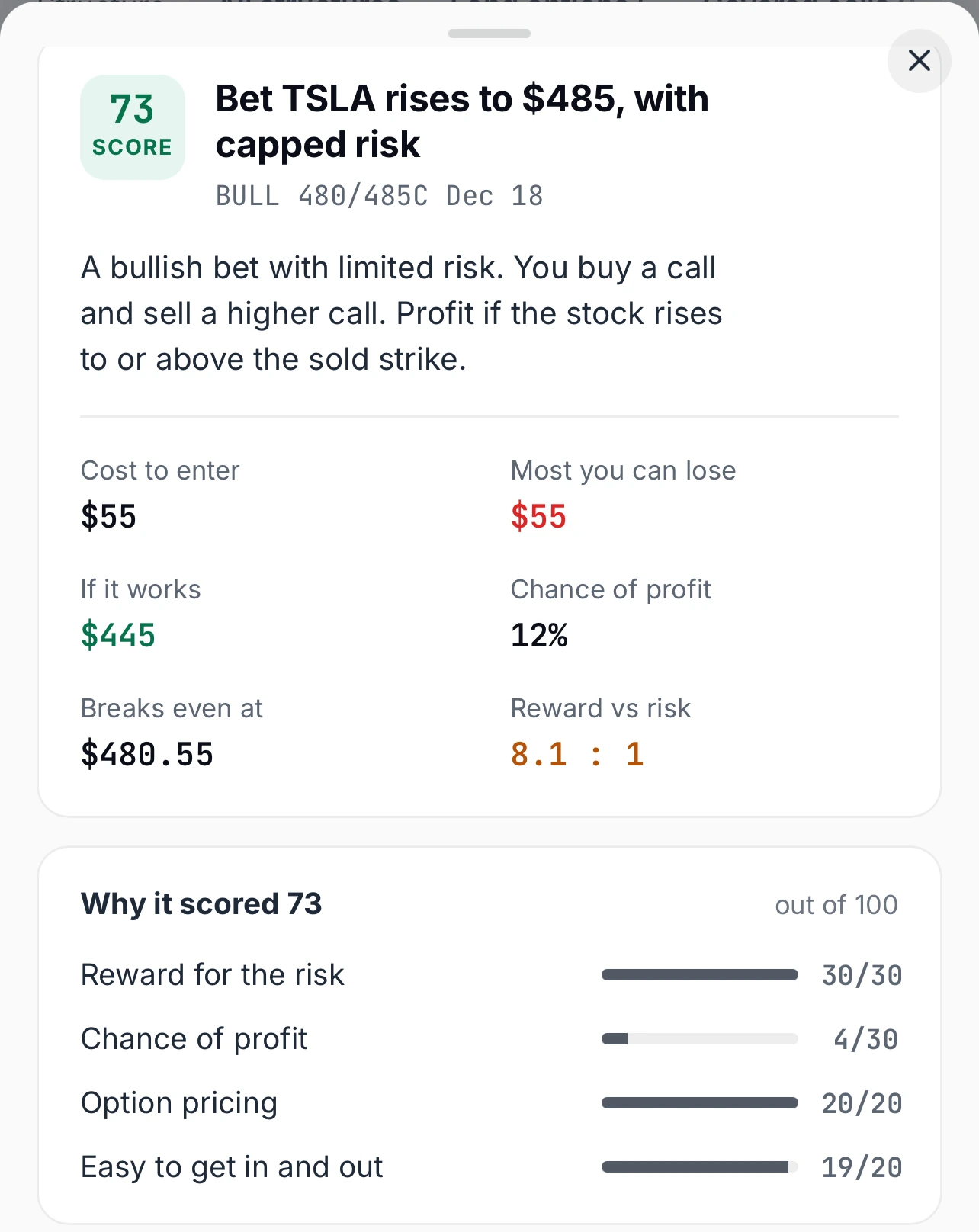
A screened trade, its numbers, and its payoff chart.
Desktop: TSLA 475/480 call spread. Phone: a separate 480/485 call spread. Both expire December 18, 2026. Phone view shows the risk card only; the desktop payoff belongs to the separate 475/480 setup.
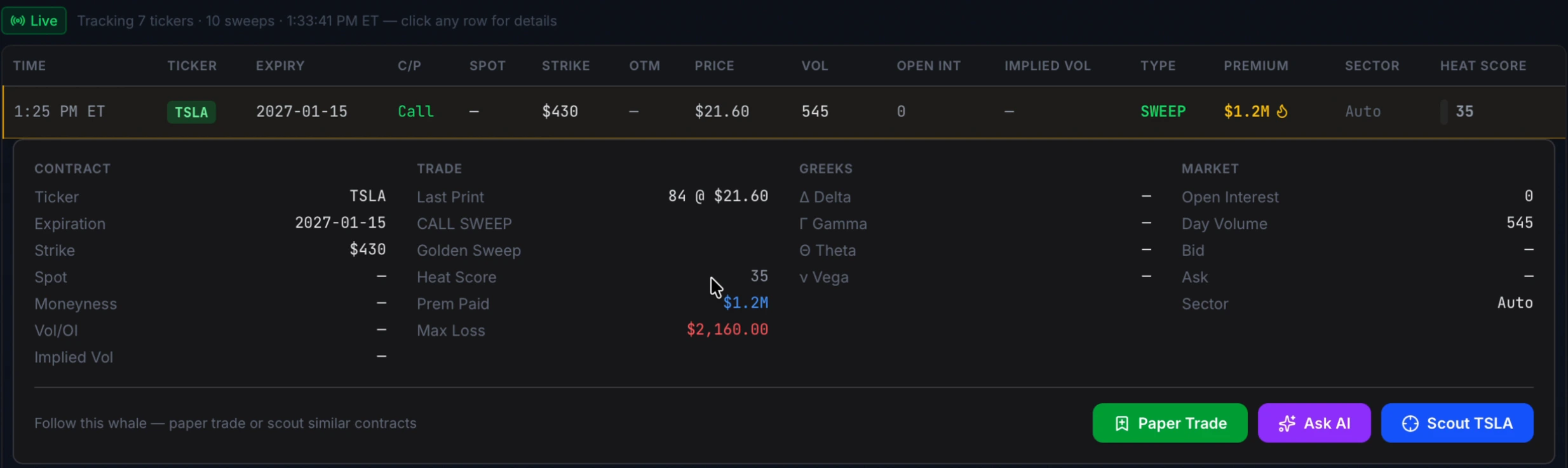
The contract you are looking into, with its shown print time.
Recorded TSLA $430 call, January 15, 2027 expiry. Print time: 1:25 PM ET; session date is not shown. The displayed $1.2M is estimated session premium, not one order. The print does not show who bought or why. Quotes and Greeks are missing in this example.
These are product examples. Model estimates and quotes do not promise returns or the price of a fill.
Pro access for 7 days. Then Trader at $29/month unless you cancel before your trial ends. Card required. One trial per person who qualifies.
Want to start without a card? Create a free account for 3 AI Advisor chats and 3 scans a day.
Your outlook.
Your risk budget.
Your call.
You want to find an options idea, check the market around it, and weigh ways to trade it.
You might be:
Scout covers long calls, long puts, covered calls, bull call spreads, bear put spreads, bull put spreads, bear call spreads, and iron condors.
You check the idea and make the call. If you place a live trade, you do it with your broker. OptionScout does not link to your broker or place orders.
Get seven days of Pro access to see how OptionScout fits the way you research trades.
Ask the AI Advisor for ideas. Check the GEX read and key levels. Compare setups in the Scanner. Bring unusual activity into the picture when it helps.
Start with one idea. Check the case for it, what you could make, and what you could lose. Then judge whether OptionScout fits your trading process.
Pro access for 7 days. Then Trader at $29/month unless you cancel before your trial ends. Card required. One trial per person who qualifies.
You get Pro access in the trial. After that, your plan is Trader. Pro-only features do not stay in your plan at the Trader price.
If you choose the free account, create an account first. You can then use the free plan’s daily limits. No card needed.
OptionScout’s AI Advisor is built for options research. It can pull near real-time stock and options data, read GEX levels, and run OptionScout’s screeners. It can also search the web and X for news and market chatter.
The AI explains its view. The screeners supply the trade-card math. You can see the tools used and check web sources when search is used.
That gives you a way to research an idea, check the market, and compare trades with numbers you can inspect.
OptionScout uses guardrails for trade cards. The screeners work out each card’s entry price, max profit, max loss, breakevens, and estimated probability of profit.
The AI picks from those screened trades. It does not write the numbers shown on the card.
Its rules also tell it to use tools for market facts and call out missing data or tool failures.
These safeguards help you check a trade. They do not make every AI answer right. Check the reasons and quotes before you trade.
OptionScout uses near real-time market data for research. Refresh speed depends on the tool and plan:
These are refresh settings. They do not mean each price is that fresh. Data can lag, and quotes can be older after hours. Some prices use marked fallback data. Check the time and price label before you trade.
For a trade idea, the Advisor can check the stock’s move, news, GEX levels, implied volatility, and time to expiration. It can then use the screeners to find setups and show trade cards.
Its rules guide it to explain why a strike and expiry fit the idea, weigh the risk against your budget, and call out weak setups.
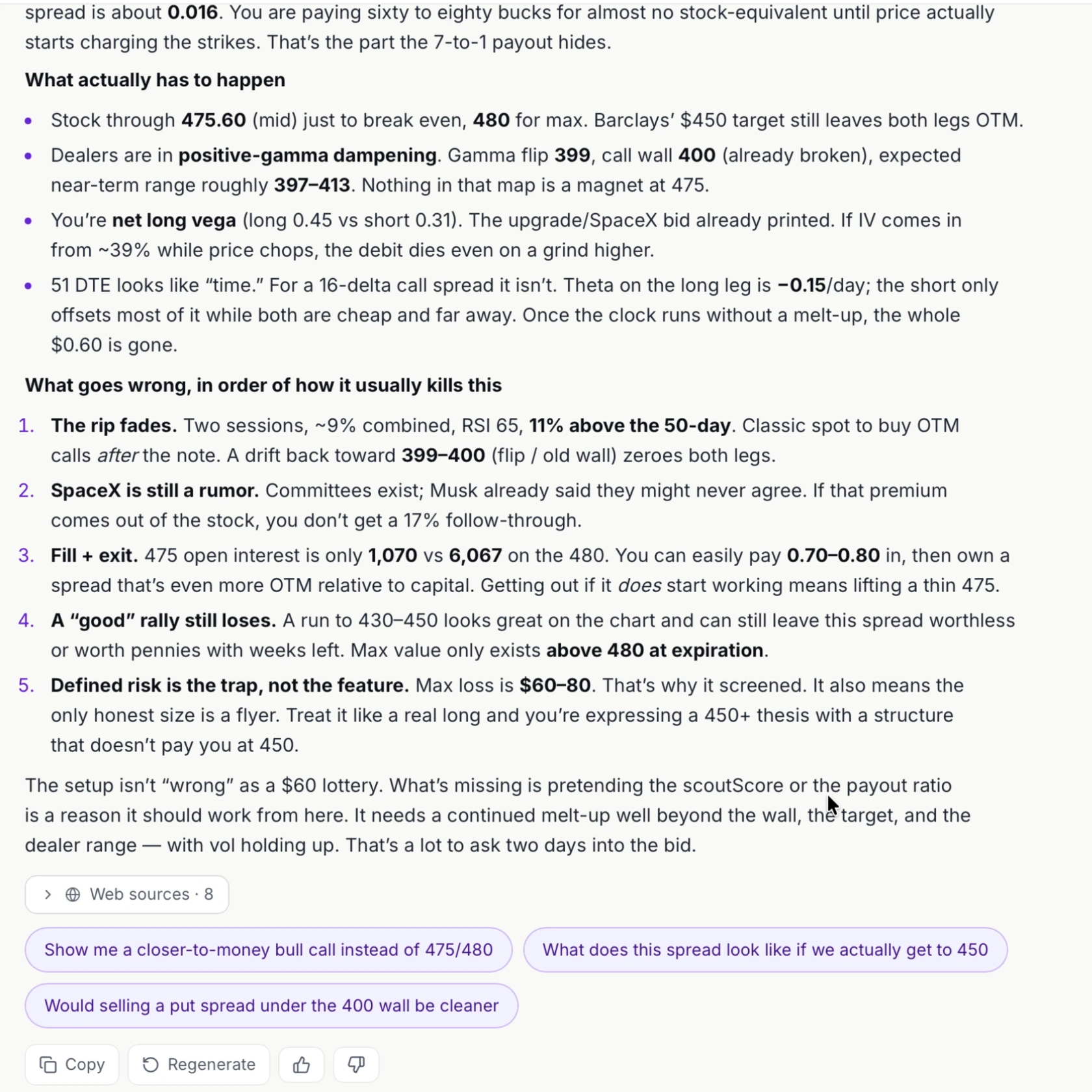
Ask what could go wrong or what you might be missing. Use that second look to check the trade against your own plan.
OptionScout is an analytics tool for finding and checking options trades. Use the AI Advisor to research ideas, GEX to read the market, and the Scanner to compare setups. Add unusual activity when it helps.
You make the call. OptionScout does not place live orders or promise profits. Its AI analysis is not investment advice.
The GEX market read turns a ticker’s gamma data into a short market view. It can show a bullish, bearish, or neutral bias, plus key levels such as the gamma flip and call or put walls when shown.
The Scanner can use that read and gamma regime to suggest a strategy and setup. Your own filters take over when you set them.
Use the read to weigh a setup against the market. It cannot tell you for sure where price will go next.
OptionScout’s Scanner covers eight strategies:
Compare the trade’s entry, risk, breakevens, and estimated payoff before you choose a setup. The Scanner does not screen every options strategy.
No. Probability of profit is a model’s estimate of a trade being in profit at expiration. It uses the stock price, breakevens, implied volatility, and time to expiration. If implied volatility is missing, the screeners use a delta-based estimate.
Scout Score ranks setups using return on risk, estimated probability of profit, implied volatility, and liquidity. It is not a measured win rate.
Use these figures to compare trades. Neither one promises what a trade will earn.
No. A large sweep could be a hedge or one part of a larger trade. The print alone does not show the trader’s full plan.
Use unusual activity as a clue. Check it against price, GEX levels, and the trade’s risk before you act.
Yes. A free account gives you:
Start with a ticker you know and try the tools within those limits. No card needed.
The seven-day Pro trial is a separate offer. It needs a card.
For this offer, you get Pro access for 7 days. You then move to Trader at $29/month unless you cancel before the trial ends.
Pro-only features are not part of Trader. You can cancel online from your account. One trial per person who qualifies; a card is required.
Use the trial to check trade ideas and see how the tools fit your own process.
From a trade card, the paper-trade button saves one BUY leg at a time. You can set a quantity for that leg. It does not save a whole spread, condor, or covered-call trade.
You can use the paper portfolio to track that leg. OptionScout does not link to your broker or place live orders.
To cancel, open Billing & Plan in your account menu. You can also change your card details there.
Need help? Email hello@optionscout.ai. Cancelling stops your next renewal. It does not refund past charges on its own. Email us with refund questions.
Start with a ticker you know.
Ask the AI Advisor to research the idea. Check the GEX read and key levels. Compare ranked Scanner setups and what they could make or lose. Bring unusual activity into the picture when it helps.
Choose a setup that fits your plan—or pass.
Pro access for 7 days. Then Trader at $29/month unless you cancel before your trial ends. Card required. One trial per person who qualifies.
Want to start without a card? Create a free account for 3 AI Advisor chats and 3 scans a day.
Analytics tool, not investment advice. Options carry risk. You can lose all the premium you pay. Some strategies can lose more than the premium. Quotes, model estimates, and examples do not promise returns or the price of a fill. You make the trade decision.
Ask the AI Advisor to find and check trade ideas. Read the market with GEX. Compare Scanner setups and what you could make or lose. Add unusual activity to the picture.
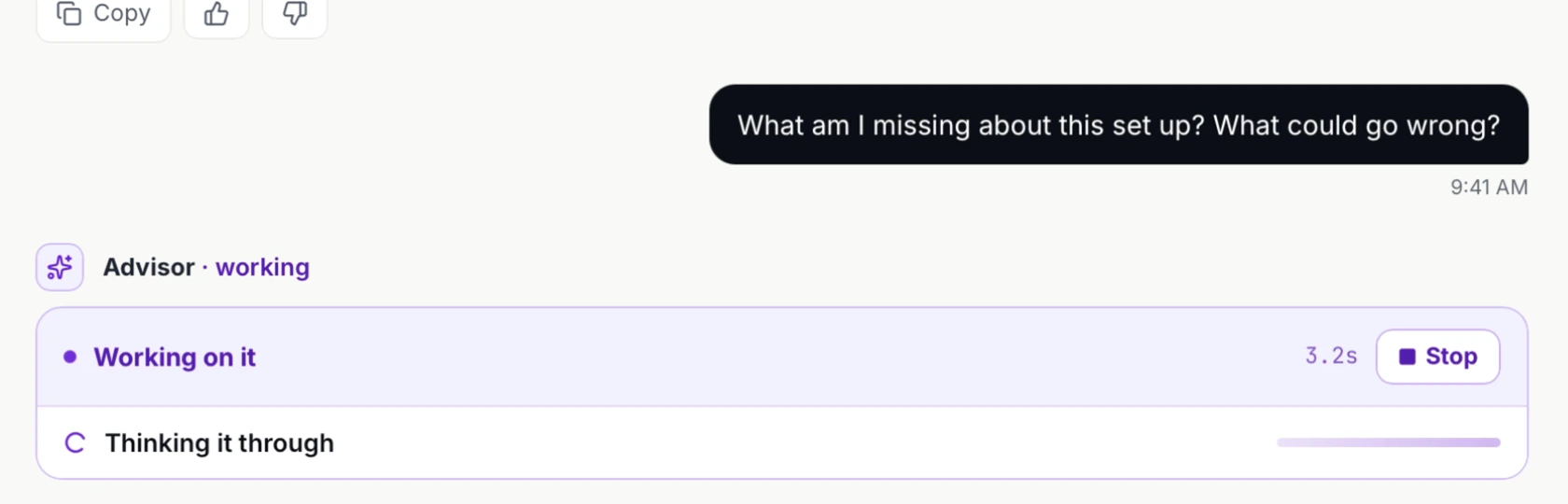
Already found a setup? Send it to the Advisor for a second look. Ask, “What am I missing?” Then check that view against your own plan before you trade.
Pro access for 7 days. Then Trader at $29/month unless you cancel before your trial ends. Card required. One trial per person who qualifies.
Want to start without a card? Create a free account for 3 AI Advisor chats and 3 scans a day.